
When it comes to sharing images on WhatsApp, many users often face issues with the image quality getting degraded. This can be frustrating, especially if you want to share high-quality images with your friends and family. However, there are ways to send original quality images on WhatsApp. In this article, we’ll discuss some simple steps to ensure that your images are sent in their original quality.
WhatsApp, owned by Meta, has been gradually releasing new features and improvements to enhance the user experience. Among these updates is the ‘Photo quality’ feature, which allows Android and iPhone users to share pictures without losing their original quality and resolution. In this article, we will discuss how to send original quality images on WhatsApp.
Step 1: Make sure you have the latest version of WhatsApp installed on your Android or iOS device.
Step 2: Launch WhatsApp and tap on the three-dot menu button at the top-right corner.
Step 3: Select the ‘Settings’ option.
Step 4: Tap on ‘Storage and data’.
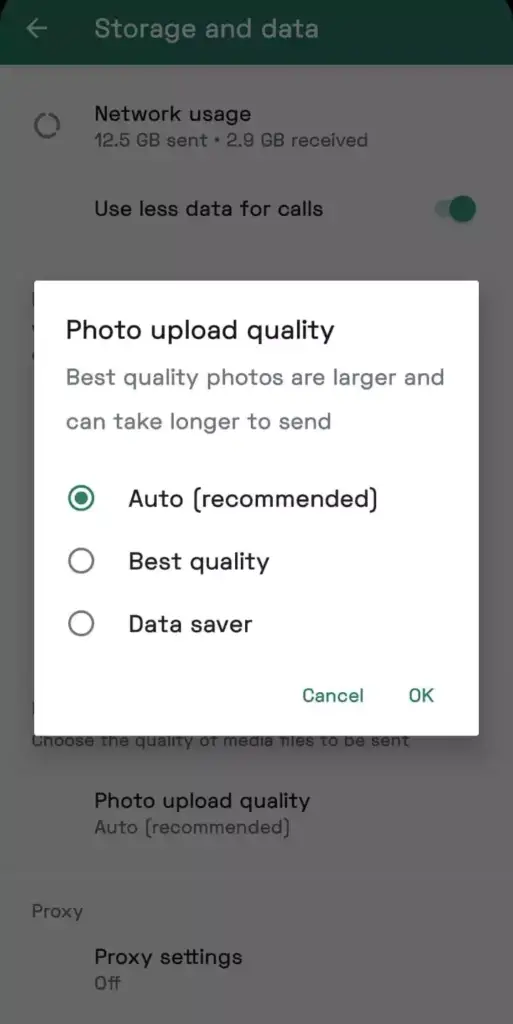
Step 5: Under the ‘Media upload quality’ section, tap on ‘Photo upload quality’.
Step 6: Choose your desired quality among ‘Auto’, ‘Best quality’ or ‘Data saver’.
How to send high Quality Images on Whatsapp for IOS
Step 1: Download the latest version of WhatsApp on your iOS device.
Step 2: Launch WhatsApp and tap on the ‘Settings’ option at the bottom-right corner.
Step 3: Tap on ‘Storage and data’.
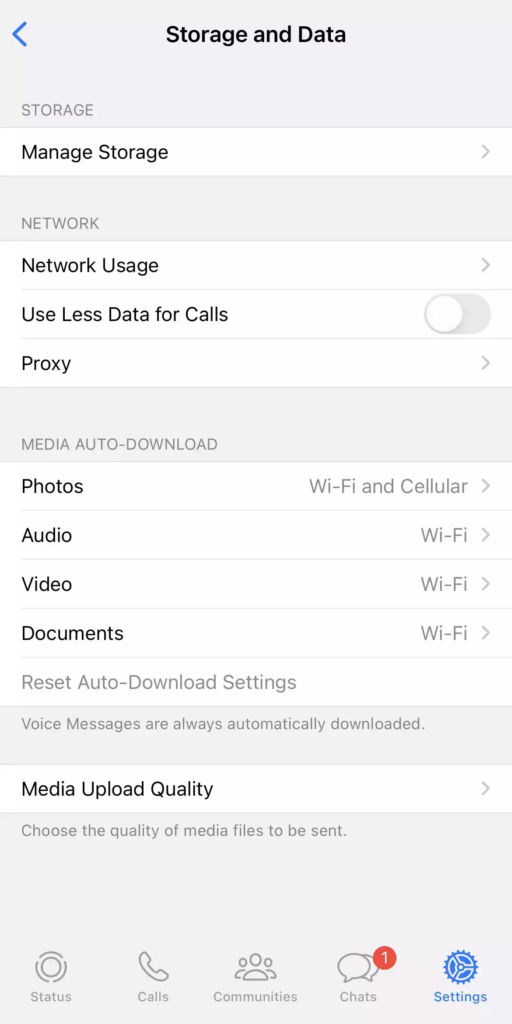
Step 4: Tap on ‘Media upload quality’.
Step 5: Select your preferred photo quality among the options available: ‘Auto’, ‘Best quality’ or ‘Data saver’.
Step 6: Hit the ‘OK’ button once you have selected your desired option.