
The safest way to buy a used iPhone in Pakistan is to check four things before any money changes hands: PTA status, Activation Lock, repair history and battery health. Each takes about a minute on the phone itself, and each one catches a different scam.
Use the checklist below in the shop or at the meeting point. If the seller refuses any check, walk away.
1. Check PTA status with the IMEI
- Dial *#06# on the iPhone to see its IMEI numbers. Phones with eSIM or dual SIM show two.
- Send each 15-digit IMEI as an SMS to 8484, or check it on PTA’s DIRBS app or dvs.pta.gov.pk (PTA DIRBS FAQ).
- Read the reply carefully:
- Compliant: PTA approved. It works on any Pakistani SIM.
- Valid / GSMA Valid: a genuine IMEI but not PTA approved. It works for only 60 days after first use on a local SIM unless someone pays the PTA tax. Price it as a non-PTA phone.
- Non-Compliant or Stolen: do not buy.
Check every IMEI. If they do not belong to the same device, the phone can be blocked. To estimate the tax on a non-PTA iPhone, see our PTA tax guide.
2. Make sure the IMEI matches everywhere
The IMEI from *#06# should match the number in Settings > General > About, on the SIM tray (on models that print it there) and on the box. A mismatch can mean a replaced board or a swapped box.
3. Test with your own SIM to rule out JV
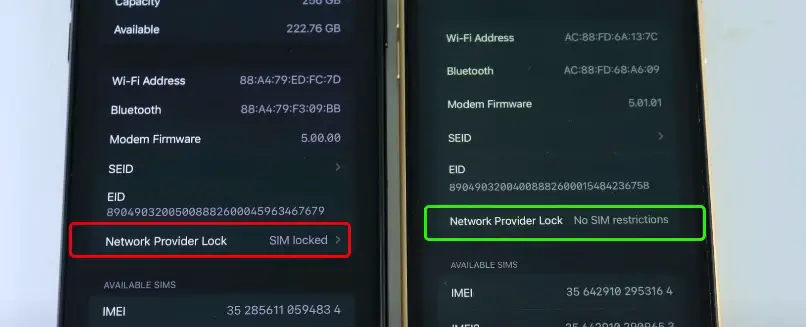
Put your own SIM in and make a call, send an SMS and use mobile data. If the seller has a thin chip or sticker under the SIM, or says “only use this SIM”, it is probably a JV (carrier-locked) iPhone. Read the disadvantages of JV iPhones before you consider one.
4. Have the seller remove their Apple Account
An iPhone still linked to the seller’s Apple Account is protected by Activation Lock, and you cannot use it after a reset. Ask the seller to sign out and erase the phone in front of you: Settings > General > Transfer or Reset iPhone > Erase All Content and Settings. Apple notes that erasing the iPhone turns off Find My and Activation Lock (Apple Support).
The phone should restart to the “Hello” setup screen. Set it up with your own Apple Account before you pay. Never accept “I will remove iCloud later”.
5. Read the Parts and Service History
On iOS 15.2 or later, open Settings > General > About. If the iPhone was repaired, a Parts and Service History section appears (Apple Support):
- Genuine Apple Part: repaired with genuine parts and Apple’s process.
- Unknown Part: often a non-genuine replacement, such as a copy screen or battery. Expect lower quality and resale value.
- Used: the part came from another iPhone.
On iPhone 12 and later this covers the battery, display, logic board and cameras; on iPhone 11 the battery and display only.
6. Check battery health
Go to Settings > Battery > Battery Health (on newer iOS, Battery Health & Charging). Below about 80% maximum capacity, battery life will feel short and you should budget for a replacement. A “Service” message means the battery needs replacing now.
7. Test Face ID or Touch ID, cameras and sound
- Set up Face ID or Touch ID. Failure often means a past repair or water damage.
- Open the camera and switch between every lens, front and back, photo and video.
- Play a video at full volume through both speakers, then record a voice note to test the microphones.
- Plug in a charger to check the port, and press every button.
8. Inspect the body and screen
Ask the seller to remove the case and screen protector. Look for dents near the corners, gaps between the screen and frame, and dead pixels on a plain white page.
9. Check warranty and paperwork
Enter the serial number on Apple’s coverage check page to see the model, purchase date and any warranty left. Ask for the box, the purchase receipt and, for a PTA-approved phone, proof that the IMEI is registered.
10. Pay safely
- Meet in a busy place, or buy from a shop that gives a written receipt.
- Never pay an advance to hold a phone.
- Pay only after every check above, then ask for a written receipt with the IMEI, price and the seller’s CNIC details.
Quick checklist
| Check | Where | Walk away if |
|---|---|---|
| PTA status | SMS IMEI to 8484 | Non-compliant or stolen |
| IMEI match | *#06#, Settings, tray, box | Numbers differ |
| Network lock | Your own SIM | Needs a chip or one SIM only |
| Activation Lock | Erase in front of you | Seller will not sign out |
| Repair history | Settings > General > About | Unknown parts the seller hid |
| Battery | Settings > Battery | “Service” message |
Related guides: Register an iPhone without a CNIC; iPhone 18 Pro Max PTA tax; Convert a physical SIM to eSIM.
Sources: PTA DIRBS FAQ; Apple: iPhone Parts and Service History; Apple: What to do before you sell your iPhone. Checked on 8 October 2026.